SkillBridge
Why this mattered
Students were moving between university and placements without a safe place to practise or understand feedback. I narrowed a three-sided platform around the student—and later tested where learning tools need productive friction.
- Duration
- 4 months, 2025
- Methods
- User Interviews, Usability Testing, Lean UX, Participatory Design
- Tools
- Figma, Miro, Notion, Agentic AI Tools

Context and stakes
SkillBridge began as a UTS studio brief from researchers working in work-integrated learning. Our five-person team was asked to connect students, academic supervisors, and workplace mentors. AI could support learning, but it could not replace educators or make decisions for students.
The first version tried to give all three groups an equal product. The dashboard accumulated assessments, simulations, mentors, meetings, goals, feedback, and messages. It looked comprehensive, but the hierarchy was weak: a student could see a lot of activity without understanding what mattered next.
My role covered research and product design across five Lean UX sprints. I independently developed key Student Dashboard and Workplace Simulator flows, ran heuristic and prototype evaluations, and helped coordinate the team after one member left. I also wrote and structured parts of the final product story for critique panels.
Research evidence
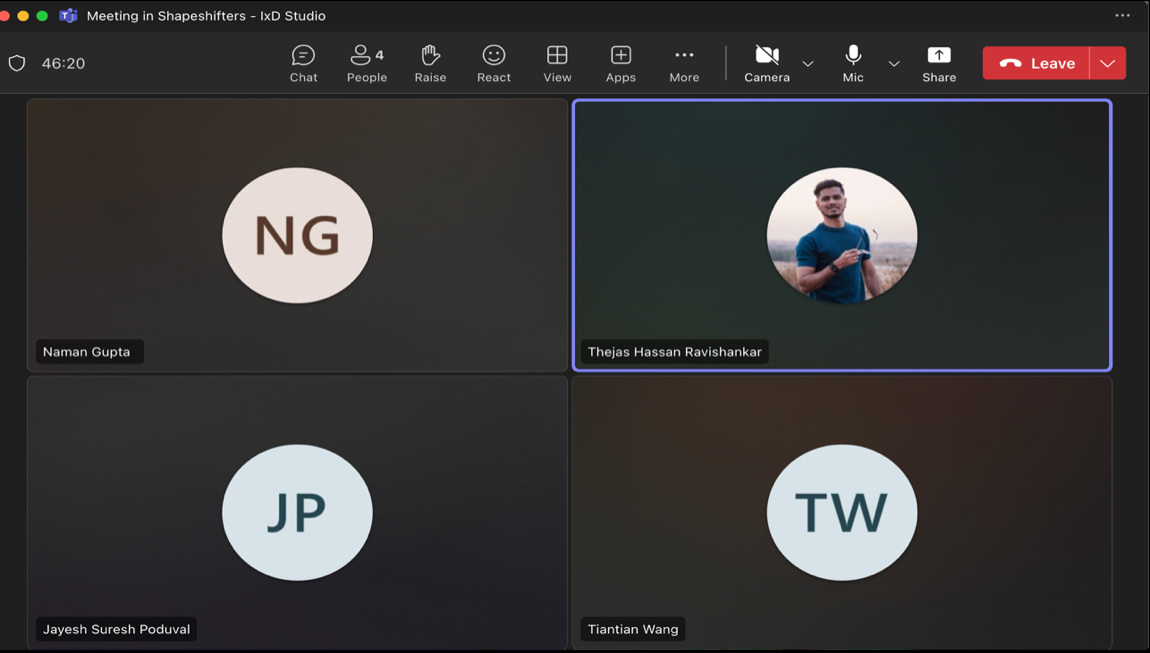
Our research mixed early prototype testing with a field study. Prototype sessions surfaced two immediate interface problems: the dashboard felt cluttered, and interaction feedback inside the Workplace Simulator was too easy to miss. One participant could not tell whether an answer had been saved or another action was required. That led to clearer confirmation, simpler progress information, and a calmer hierarchy.
For the field study, I drafted recruitment material and conducted two semi-structured interviews with WIL students, online and in person, with consent. I took notes, pulled direct observations into the team synthesis, and contributed to affinity mapping across onboarding, mentor feedback, tool skills, and learning curves.


Three needs repeated across our evidence:
- Students could identify missing software skills more easily than professional skills such as handling ambiguity, presenting to stakeholders, or responding to feedback.
- Feedback arrived through disconnected university and workplace channels, which made progress hard to interpret over time.
- Students had few safe opportunities to rehearse interpersonal situations before a placement made them real.
These were qualitative findings from a small project study, not population-level claims. They gave us a direction to test: make the student the primary user, then let supervisors contribute structured inputs around that experience.
The student-first decision
After the second sprint, I argued that serving all stakeholders equally was creating a product for nobody in particular. We narrowed the daily experience to students. Academic and workplace supervisors still mattered, but their role became providing assessments, scenarios, and feedback rather than navigating the same dashboard.
The revised hierarchy focused on four connected jobs:
- Skill Analyser: role-specific assessments tied to a student’s placement rather than a generic employability score.
- Workplace Simulator: scenario practice for situations such as presenting findings, receiving critical feedback, or working across functions.
- Feedback Gallery: structured academic and workplace observations in one timeline, tied back to activities.
- Blue: contextual prompts for reflection and resources, positioned as a thinking aid rather than an answer machine.
How I worked with AI — support the thinking, do not replace it
AI played two different roles in this work. Inside the SkillBridge concept, Blue and the Workplace Simulator were designed to prompt reflection, create practice situations and adapt feedback while leaving the decision with the learner. That boundary mattered: a learning tool becomes less useful if it completes the judgement the student is meant to practise.
Later, while researching job-simulation platforms, I used Copilot and Gemini to summarise public literature, draft parts of the user-testing protocol and refine the clarity of my writing. I did not upload participant transcripts, unpublished findings or raw heuristic data. I checked the outputs for accuracy, bias and relevance; the synthesis, interpretation and conclusions remained mine.
For me, being AI-native means knowing where the tool can extend the process and where it must stop.

The early dashboard organised the product around the breadth of the brief rather than the needs of its daily user.
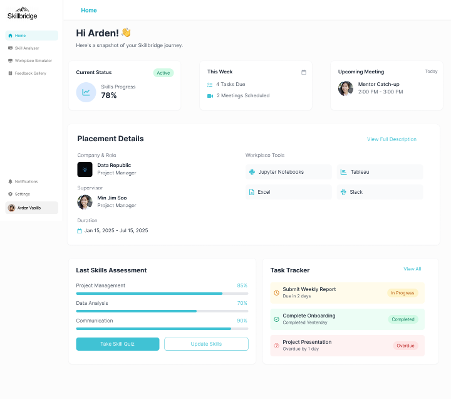
The final dashboard centres four connected student jobs instead of three competing stakeholder products.
The resulting product
The Workplace Simulator became the most distinctive part of the proposal, but we did not prove that it improved workplace performance. What we proved was narrower: students and reviewers could understand the scenario-practice proposition, and prototype feedback helped us clarify its controls and feedback states.
Workplace Simulator
Role-specific scenarios give students a safer place to rehearse professional judgement, then make the active session and its feedback state visible.
Prototype evidence only: we did not establish an improvement in workplace performance.


An expert critique panel challenged the positioning, target market, onboarding, mentor approval flow, and the Feedback Gallery. We recorded those suggestions in an action table and changed the prototype where the feedback aligned with our evidence. That panel was valuable product feedback; it was not a commercial endorsement or a commitment to build the platform.
The final output was a high-fidelity team prototype, not a production service. I refined onboarding, the Student Dashboard, and the Skill Analyser; helped close the feedback loop between critique and design; and built reusable Figma components for the final flows.

Later research and limitations
The project exposed a deeper question: a simulation can be easy to use and still do too much of the work for the learner. I carried that question into a separate five-month graduate research project on existing job-simulation platforms.
That later study compared Forage and Springpod through heuristic evaluation, then tested Forage remotely with four early-career participants using think-aloud, semi-structured interviews, and the System Usability Scale. Three of four participants scored the interface above 80 SUS, yet all four failed the primary Help task. Expert participants also described parts of the simulation as passive or overly scaffolded.
The sample was small and the behavioural study covered one platform, so the results are not statistically generalisable. They do support a useful design principle: friction is not automatically a defect in a learning product. Some decisions, ambiguity, and consequence may need to remain with the learner.
Accepted at OzCHI 2026
The follow-on paper, Complete but Not Practising: Examining Agency and Professional Realism in Skill-Based Job Simulations, was accepted at OzCHI 2026, Australasia’s leading forum for HCI research and practice. The acceptance recognises the research contribution; it does not turn this small exploratory study into proof that the SkillBridge concept improves learning or workplace performance.
Read the accepted paper (anonymous review version)
That is the clearest outcome of SkillBridge for me. The prototype taught me to narrow a multi-stakeholder system around one primary user. The later research taught me to ask whether a clear interface is also preserving the work a learner needs to do.